Simple Process, Powerful Results

How Sanvia Works

From raw data to accurate forecasts in four simple steps. Transparent process, no black boxes, realistic expectations.

Try It Now

Upload Your Data

Import your historical sales data in Excel or CSV format.

What you can do

  • Supports .xlsx, .xls, and .csv file formats
  • Handles both wide format (columns as time periods) and long format
  • Automatic wide-to-long transformation with user-specified date ranges
  • Manual column selection with interactive click interface
  • Supports multi-column forecasting (up to 20 columns)

Requirements

  • Minimum 10-30 historical data points (model dependent)
  • Consistent time intervals (daily, weekly, monthly, quarterly, yearly)
  • Clean numeric data for target columns
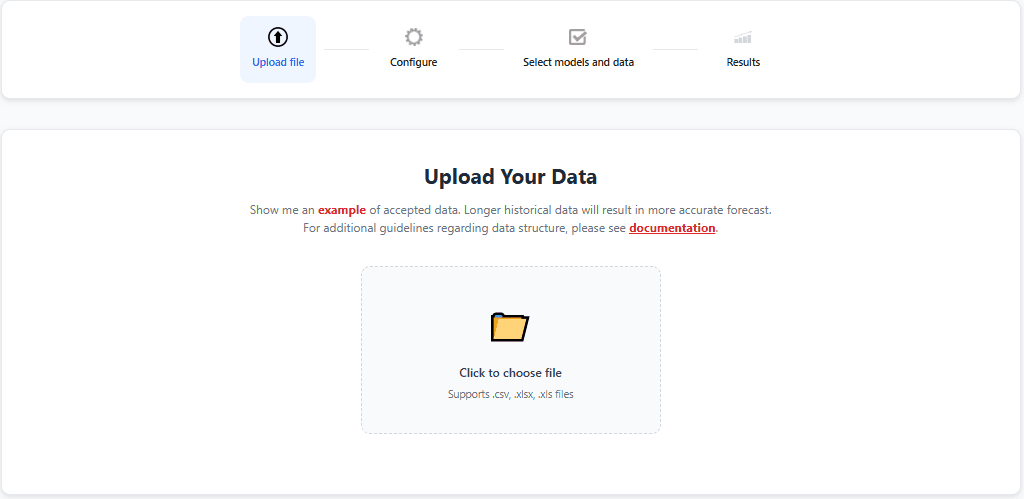
Sanvia file upload interface showing drag and drop area for CSV and Excel files

Configure Your Forecast

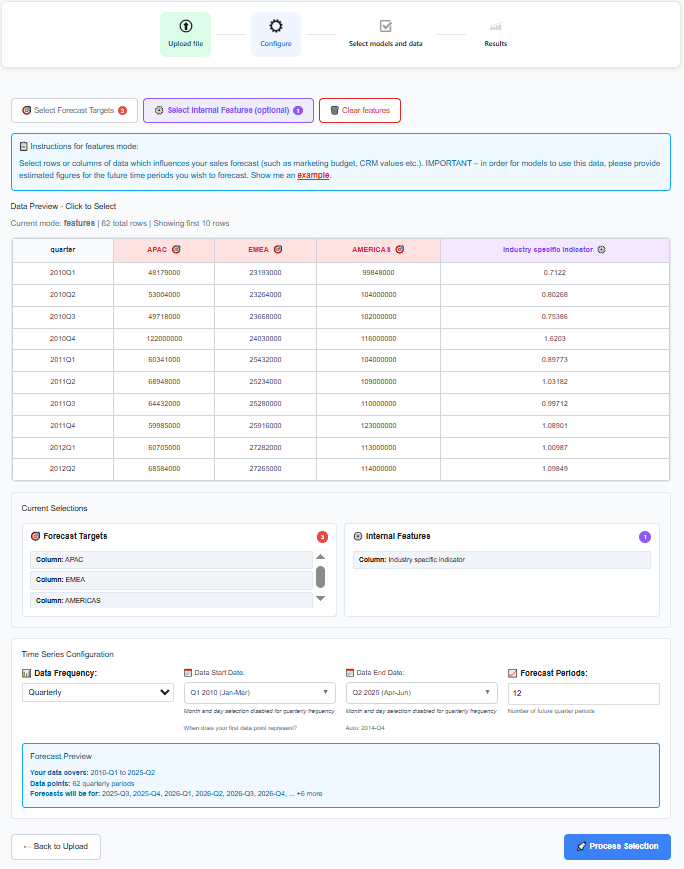
Select columns, set your forecast horizon, and add internal features.

What you can do

  • Click columns to select forecast targets
  • Add internal features like marketing spend or inventory
  • Specify forecast horizon (1-36 periods typically)
  • Define data frequency (daily to yearly)
  • Preview your data before processing

Smart features

  • Automatic frequency detection
  • Data validation and error checking
  • Flexible date format parsing
  • Multi-column selection in one click
Data configuration screen showing column selection for APAC, EMEA, and Americas regions with time series settings

Select Models & Features

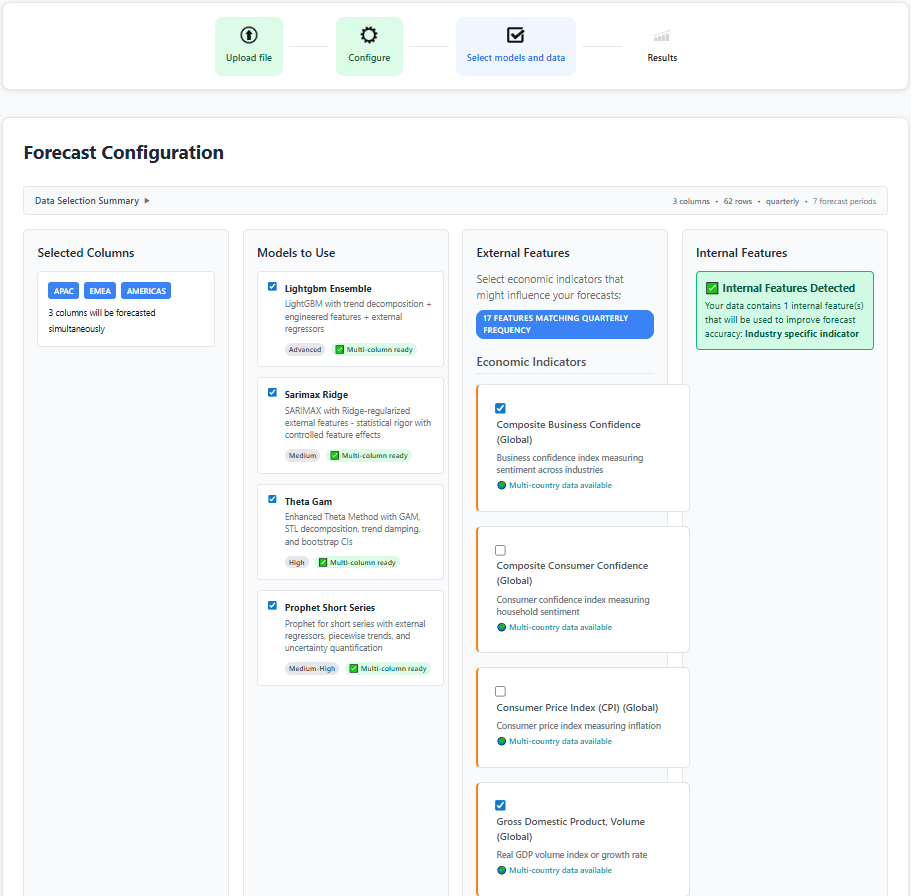
Choose forecasting models and add external economic indicators.

What you can do

  • LightGBM Ensemble: Gradient boosting with auto-engineered features
  • SARIMAX-Ridge: Statistical model with regularization
  • Theta-GAM: Decomposition with non-linear relationships
  • Prophet Short Series: Optimized for limited data

External data

  • 20+ external economic indicators available
  • Automatic frequency matching to your data
  • Multi-country data for global businesses
  • Internal features detected automatically
Model and feature selection screen showing LightGBM, SARIMAX-Ridge, Theta-GAM, and Prophet options with external economic indicators

Results & Analysis

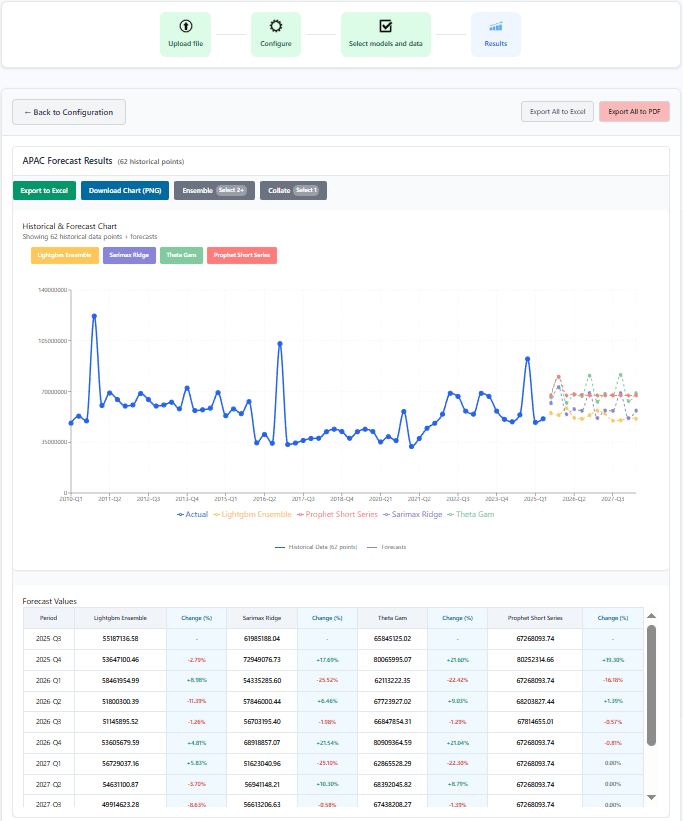
Get comprehensive forecasts with visual comparisons and exports.

What you can do

  • Interactive chart with historical data and forecasts
  • Side-by-side model comparison
  • Period-by-period forecast values with change percentages
  • Export to Excel or download charts as PNG
  • Collate multiple columns into aggregate forecasts

Insights

  • Compare how different models handle your data pattern
  • Identify which model best captures your trends
  • Use confidence intervals for scenario planning
  • Track multi-column forecasts simultaneously
Forecast results page showing interactive chart with multiple model predictions and data table with period-by-period values

Technical Capabilities

Advanced features built on proven forecasting methodologies

Auto Feature Engineering

LightGBM automatically creates lag features (1-12 periods), rolling statistics, and Fourier transformations for seasonality.

Reduces manual feature work by 90%

Optimal Lag Detection

Cross-correlation analysis automatically finds the best time delay between external features and your target variable.

Maximizes predictive signal from features

Multi-Column Forecasting

Forecast up to 20 time series simultaneously. Compare products, regions, or metrics side-by-side.

Saves hours of repetitive work

Internal + External Features

Combine your proprietary data (marketing spend, inventory) with external economic indicators for richer predictions.

Bridge internal and external data seamlessly

Time Series CV

Proper time series cross-validation respects temporal order, preventing data leakage and overfitting.

Realistic accuracy estimates you can trust

Confidence Intervals

Bootstrap or analytical confidence intervals quantify forecast uncertainty for better decision-making.

Know the range of possible outcomes

Transparent About Our Limitations

What to Expect (And What Not To)

We believe in setting realistic expectations. Here's what you should know:

Minimum Data Requirements

  • Prophet: 10+ data points minimum
  • SARIMAX/LightGBM: 30+ points recommended
  • More data = better accuracy. 50+ points ideal

External Feature Constraints

  • Features must match your data frequency
  • Some features only have historical data
  • Data sourced from CSV storage, not real-time

Manual Selection Required

  • You must select date, target, and feature columns
  • No fully automated "one-click" forecasting
  • Requires basic understanding of your data

Forecasting Reality

  • No model can predict black swan events
  • Accuracy decreases further out you forecast
  • Past patterns may not continue

Our Commitment

Despite these limitations, Sanvia provides transparent, validated, and professionally-implemented forecasting models. We're honest about what we can and can't do, and we're continuously working to expand capabilities while maintaining accuracy and reliability.

Ready to Get Started?

Upload your data and get your first forecast in under 10 minutes.

14-day free trial • Cancel anytime

How Sanvia Works | Sales Forecasting in 4 Simple Steps | Sanvia