Most "best forecasting tools" articles are thinly veiled ads. Rankings suspiciously match whoever's paying affiliate commissions.
This guide is different. We'll give you a framework to evaluate any forecasting tool — including ours — and be honest about trade-offs. Yes, we make Sanvia, so we're biased. But we'd rather you pick the right tool for your situation than buy something that doesn't fit.
Why This Matters Now
The forecasting software landscape has shifted dramatically:
What's changed:
- ML models that once required data science teams are now accessible through modern platforms
- Cloud deployment eliminated six-figure implementation projects
- API-first architectures replaced monolithic enterprise suites
- Economic uncertainty made accurate forecasting a C-suite priority
What hasn't changed:
- Most businesses still forecast in Excel
- Enterprise tools still cost €50-100K+ annually
- Implementation timelines still stretch 6-18 months for legacy platforms
The gap between "spreadsheet chaos" and "enterprise overkill" is where the interesting options now exist.
The Evaluation Framework
Before comparing specific tools, establish what actually matters for forecasting software. Not all criteria carry equal weight for every business.
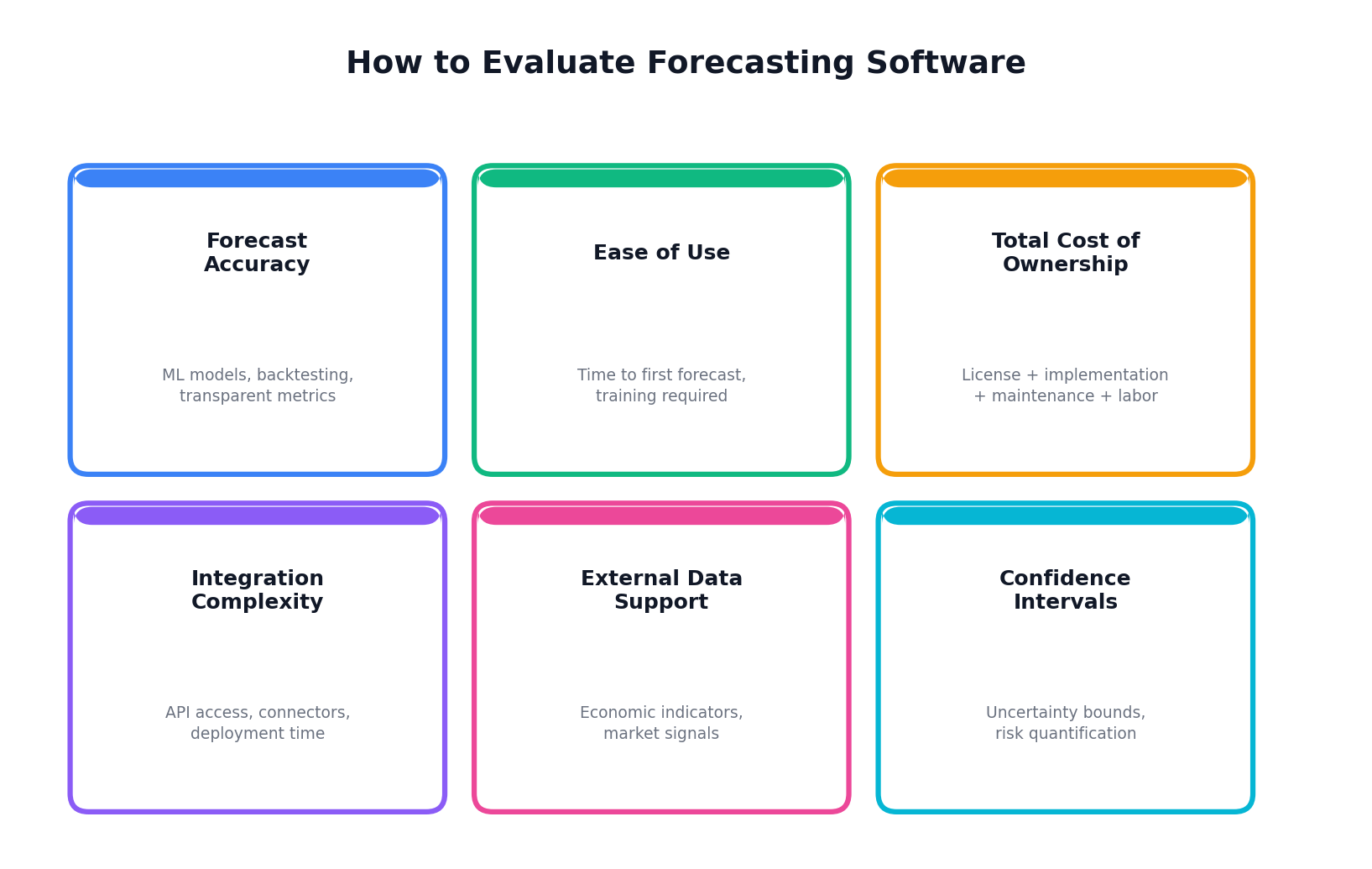
Core Criteria
Forecast Accuracy The fundamental metric. Look for platforms that offer multiple model types (statistical + ML), automatic model selection, and transparent accuracy metrics like MAPE. Beware tools that don't let you measure accuracy on held-out data.
Ease of Use / Time to Value How long from sign-up to first forecast? Enterprise platforms often require months of implementation. Modern tools should deliver value in hours or days. Consider: who needs to be involved? Just you, or IT, data engineering, and a consulting firm?
Total Cost of Ownership Sticker price tells half the story. Factor in:
- Implementation and consulting fees
- Training and onboarding time
- Integration development costs
- Ongoing maintenance and support
- Internal headcount to manage the system
A "free" spreadsheet approach often costs more than software when you account for analyst time and error rates.
Integration Complexity Does it connect to your data sources? Consider ERP, CRM, data warehouses, and BI tools. API-first platforms integrate in days. Legacy systems may require middleware and custom development.
External Data Support Can the tool incorporate economic indicators, market data, or other external signals? This separates basic extrapolation from intelligent forecasting that adapts to changing conditions.
Confidence Intervals A point forecast without uncertainty bounds is dangerous. You need to know: is this forecast €500K ± €20K or €500K ± €150K? The planning implications are completely different.
Multi-Product / Multi-Region How does the tool handle complexity? Forecasting 10 SKUs is different from 10,000. Some tools charge per forecast series, making scale expensive.
Tool Categories
The market divides into four distinct categories, each with different philosophies and trade-offs.
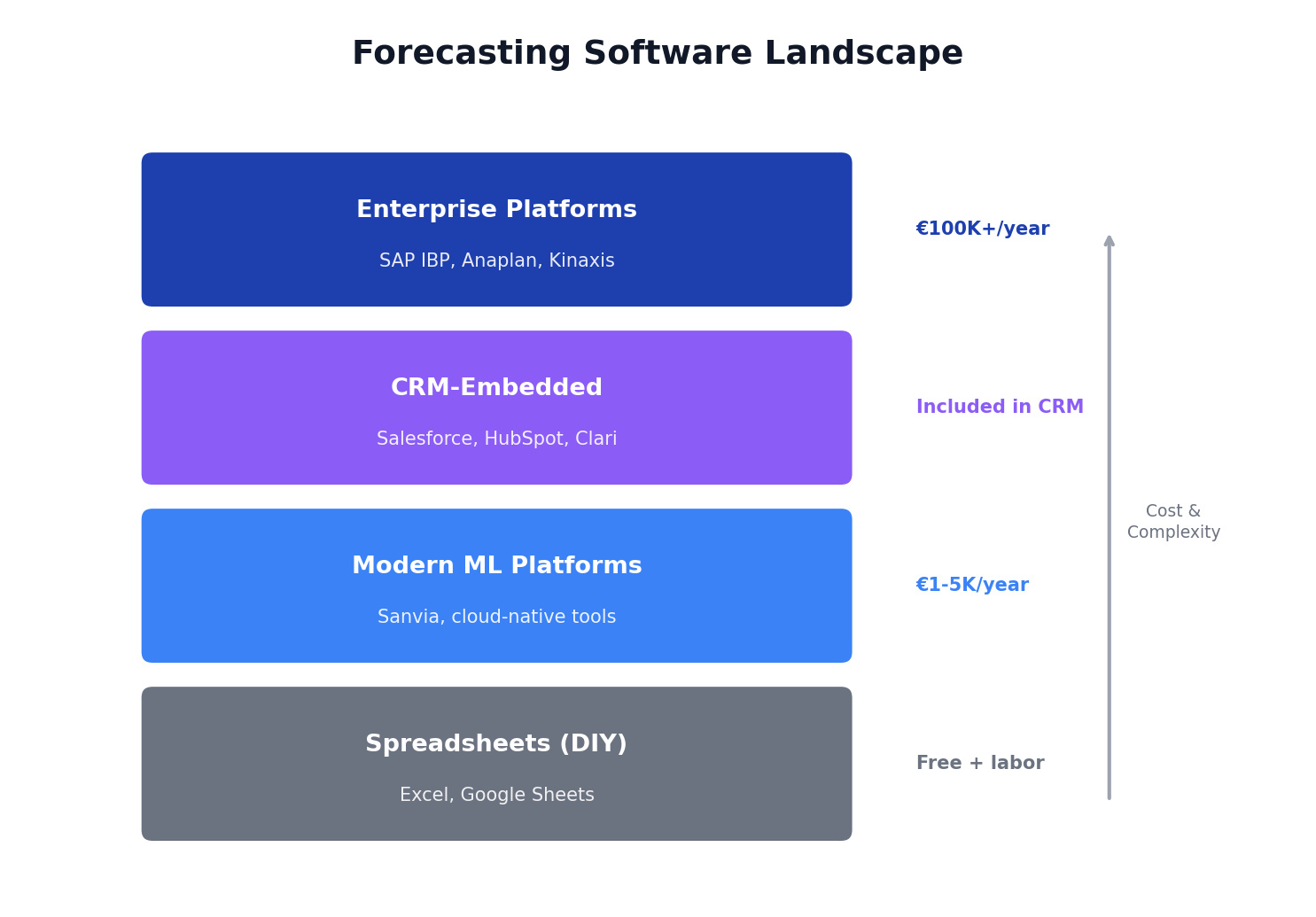
Category 1: Spreadsheets (DIY Approach)
Tools: Microsoft Excel, Google Sheets
The default starting point for most businesses. Familiar, flexible, and technically free.
Strengths:
- Zero software cost
- Complete flexibility and control
- No vendor dependency
- Everyone knows how to use it
Weaknesses:
- Manual process, doesn't scale
- No ML capabilities without significant expertise
- Error-prone (formula mistakes, version control)
- No automated external data integration
- Time-intensive maintenance
True Cost: "Free" is misleading. A finance analyst spending 2 days/month on forecasting at €80K salary = €8K/year in labor alone. Add error costs (stockouts, overstock, bad decisions) and the true cost often exceeds paid software.
Best For: Very early-stage businesses, simple product lines (<10 SKUs), or situations where forecasting isn't business-critical.
Graduate When: You're spending more than a few hours monthly on forecasting, accuracy matters for operations, or you're scaling beyond a handful of products.
Category 2: Modern ML Platforms
Tools: Sanvia, and similar cloud-native forecasting platforms
Purpose-built for forecasting with modern ML, designed for fast deployment without enterprise complexity.
Strengths:
- Multiple ML models (gradient boosting, Prophet, SARIMAX, etc.)
- Fast time-to-value (hours/days, not months)
- Parallel forecasting of product groups, regions or divisions
- External data integration (economic indicators)
- Transparent, predictable pricing
Weaknesses:
- Fewer integrations than legacy enterprise tools
- Less suitable for full S&OP/IBP workflows
- Newer vendors = less track record
True Cost: Typically €1-5K/year for most use cases. No implementation fees, no consulting required, minimal IT involvement.
Best For: Businesses that need ML-powered accuracy without enterprise complexity. Companies graduating from Excel or looking for a modern alternative to legacy platforms.
Where Sanvia Fits: We built Sanvia for this category. Four production ML models (LightGBM, Prophet, SARIMAX-Ridge, Theta-GAM), external feature integration, and deployment in minutes rather than months. Pricing from €79-249/month. We're transparent that we don't yet match enterprise platforms on integrations — but we ship accurate forecasts fast.
Category 3: Enterprise Planning Platforms
Tools: SAP IBP, Oracle Demantra, Anaplan, Kinaxis, o9 Solutions
Full-suite platforms designed for large enterprises with complex supply chains and S&OP processes.
Strengths:
- Comprehensive planning capabilities beyond forecasting
- Deep ERP integrations (especially same-vendor)
- Proven at massive scale
- Full S&OP/IBP workflow support
- Extensive partner ecosystems
Weaknesses:
- High cost (€50-200K+/year licensing alone)
- Long implementation (6-18 months typical)
- Requires dedicated team or consultants to manage
- Often overkill for pure forecasting needs
- Legacy architectures in some cases
True Cost: Budget €100-500K for year one (license + implementation + consulting). Ongoing costs €50-150K/year including internal headcount. ROI exists but requires scale to justify.
Best For: Large enterprises with complex, multi-tier supply chains. Businesses needing integrated S&OP, demand planning, inventory optimization, and supply planning in one platform.
Consider Carefully If: You primarily need forecasting, not full supply chain planning. The implementation timeline and cost may not match your urgency.
Category 4: CRM-Embedded Forecasting
Tools: Salesforce Einstein, HubSpot Forecasting, Clari, Gong
Forecasting built into sales CRM platforms, focused on pipeline and revenue prediction.
Strengths:
- Native CRM integration
- Adoption by sales teams (it's where they already work)
- Pipeline-specific insights
- Deal scoring and risk identification
Weaknesses:
- Not demand/inventory forecasting
- Often rule-based, not true ML
- Dependent on CRM data quality
- Limited to sales pipeline use case
True Cost: Usually included in CRM subscription or modest add-on. But remember: this solves a different problem than demand forecasting.
Best For: Sales leaders forecasting pipeline and quota attainment. Not a replacement for operational demand forecasting.
Important Distinction: CRM forecasting predicts "will this deal close?" Demand forecasting predicts "how many units will we sell?" Different questions, different tools.
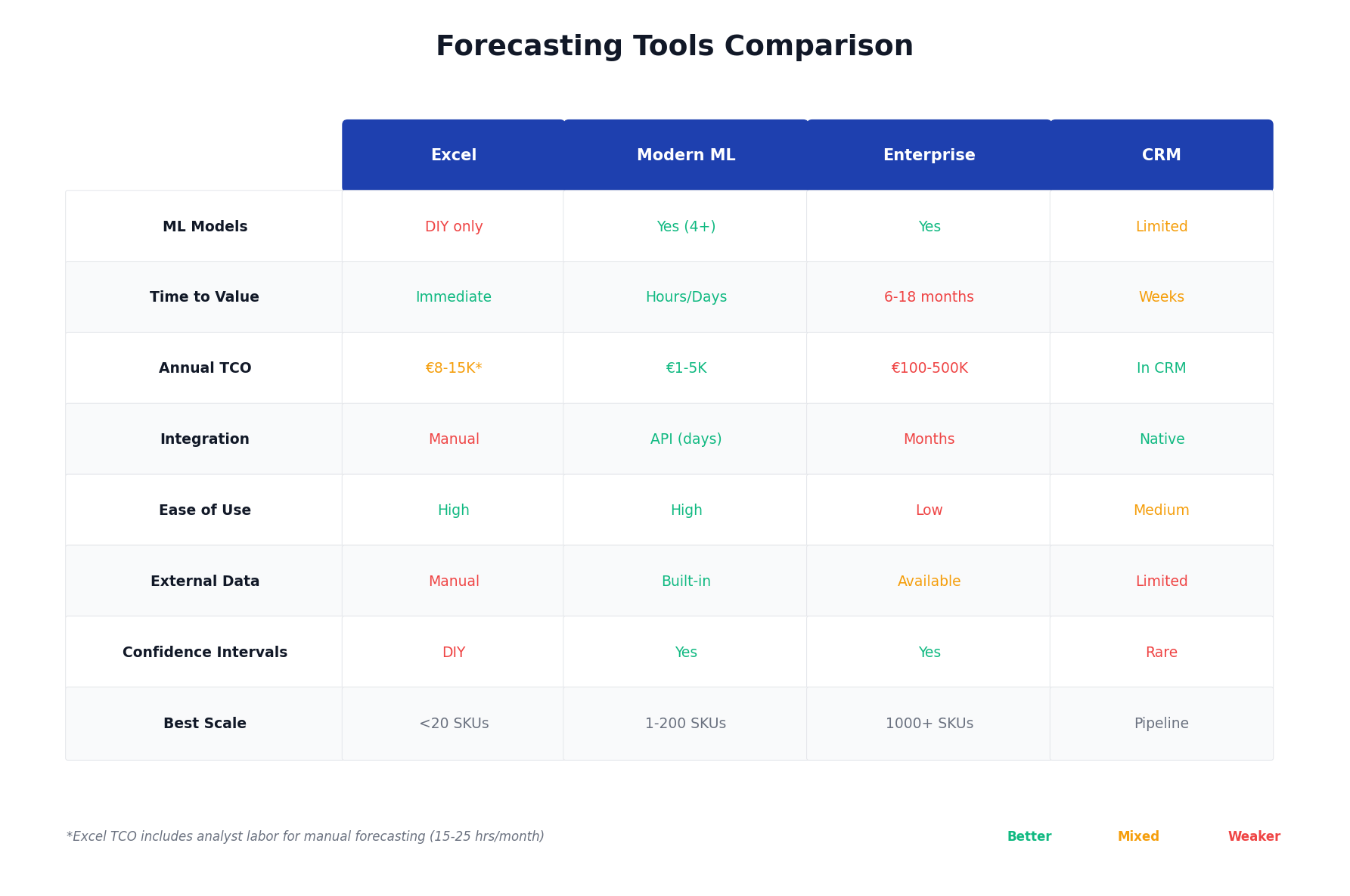
Head-to-Head Comparison
Here's how the categories stack up across key criteria:
Total Cost of Ownership: The Full Picture
Software licensing is often the smallest part of forecasting costs. Here's what businesses actually spend:
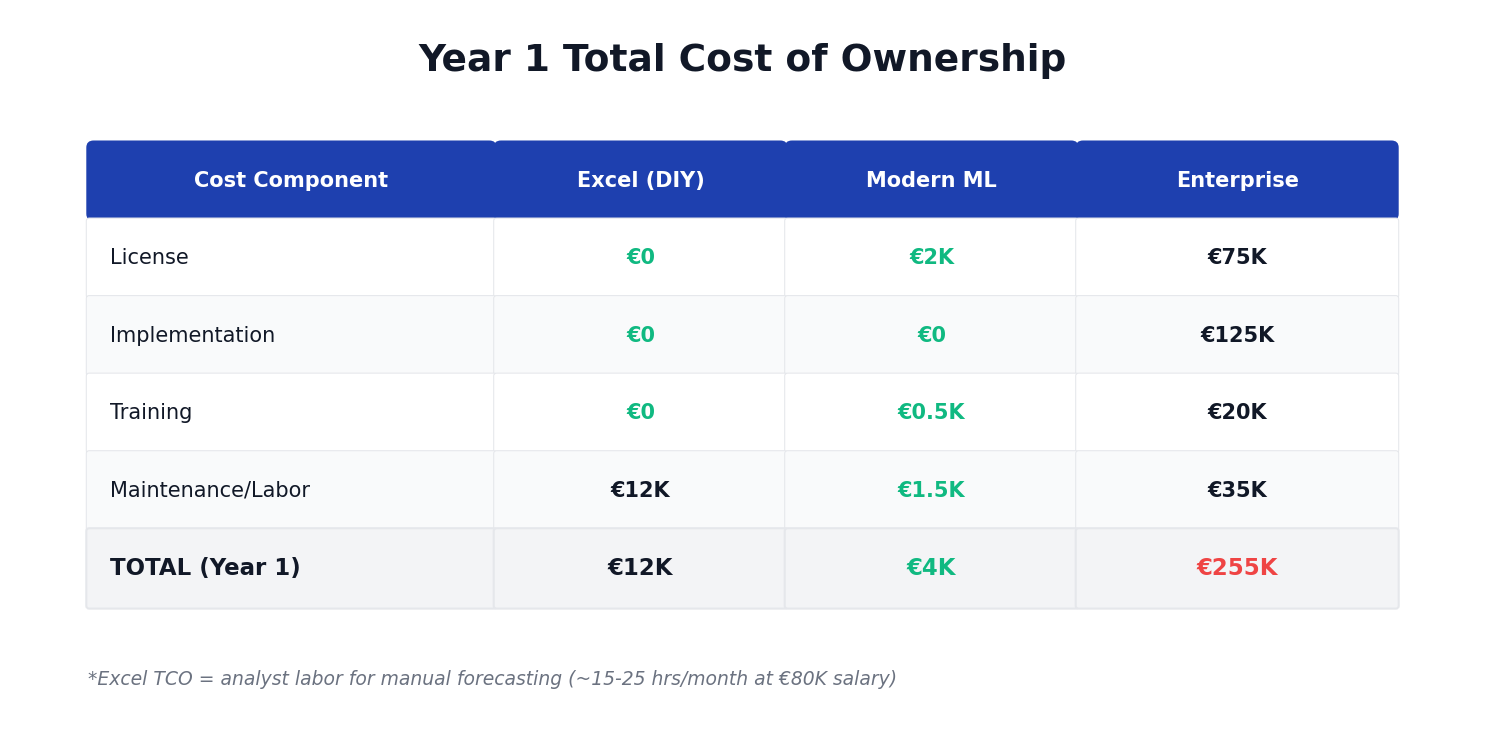
Enterprise costs assume mid-market implementation. Large enterprise implementations often exceed these figures.
The Excel row deserves explanation: while the software is free, analyst time for manual forecasting, error correction, and reconciliation typically runs 15-25 hours monthly. At loaded labor costs, that's real money — plus the opportunity cost of what those analysts could otherwise do.
Decision Framework: Which Approach Fits?
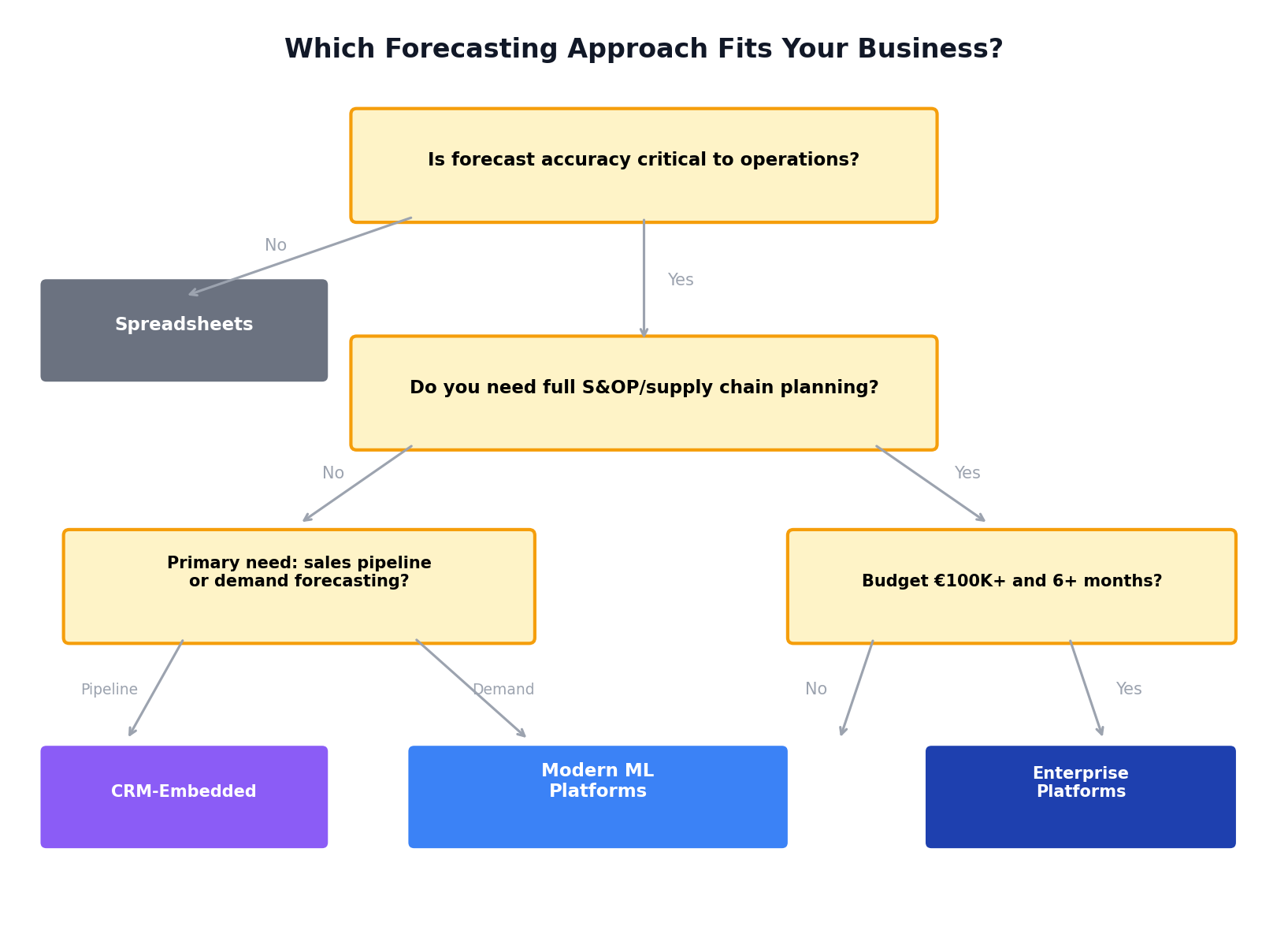
Choose Spreadsheets if:
- Forecasting is a minor part of operations
- You have <10 products/series to forecast
- Accuracy requirements are loose
- Zero budget for software
Choose Modern ML Platforms if:
- Forecast accuracy directly impacts operations or financials
- You need results fast (days, not months)
- Budget is constrained but not zero
- You want ML without hiring data scientists
- You're graduating from Excel
Choose Enterprise Platforms if:
- You need integrated S&OP/IBP workflows
- Complex multi-tier supply chain
- Already invested in the vendor ecosystem (SAP, Oracle)
- Budget and timeline accommodate long implementation
- You have (or will hire) dedicated planning team
Choose CRM-Embedded if:
- Primary need is sales pipeline forecasting
- Sales team adoption is the priority
- Operational demand forecasting is handled elsewhere
Questions to Ask Any Vendor
Before committing to a forecasting platform, get clear answers on:
-
What models do you use? Look for specific answers (LightGBM, ARIMA, Prophet), not vague "AI/ML" claims.
-
How do you measure accuracy? They should mention MAPE, MAE, or similar metrics with backtesting methodology.
-
What's the true all-in cost for year one? Include implementation, training, integrations, and internal time.
-
How long until we see first forecasts? Days, weeks, or months?
-
Can we test with our own data before committing? Good vendors offer trials with real data.
-
What happens to our data? Understand data residency, security, and privacy.
-
How do you handle external variables? Economic data, seasonality, events.
-
What's the exit path? Can you export your data and models if you leave?
Our Honest Take
We built Sanvia because we saw too many businesses stuck between "Excel chaos" and "enterprise overkill."
Where Sanvia excels:
- Fast deployment (minutes to first forecast)
- Multiple production ML models with automatic selection
- External economic indicators built-in
- Transparent, predictable pricing
- No implementation project required
Where we're still building:
- Deep ERP integrations (we have APIs, but not pre-built connectors for every system)
- Full S&OP workflow (we do forecasting, not integrated business planning)
- Track record (we're newer than 20-year-old enterprise vendors)
If you need a full S&OP suite with deep SAP integration and have the budget and timeline for enterprise implementation — we're probably not your best fit today.
If you need accurate ML forecasts fast, without the enterprise tax — we'd love you to try us.
Frequently Asked Questions
What's the best free forecasting software? Excel and Google Sheets are free but require manual work. The hidden cost is analyst time. For true "free," open-source options like Prophet (requires Python) exist but need technical expertise.
How much should forecasting software cost? Modern ML platforms run €1-5K/year. Enterprise platforms run €50-200K+/year including implementation. The right answer depends on the complexity of your needs and value of forecast accuracy to your business.
Can AI really forecast better than Excel? Yes, when properly implemented. ML models capture non-linear patterns, multiple seasonalities, and external factors that simple moving averages miss. Typical accuracy improvements range 15-30% vs. basic methods.
How long does implementation take? Modern cloud platforms: hours to days. Enterprise platforms: 6-18 months. This is often the deciding factor for businesses with urgent forecasting needs.
What data do I need to start forecasting? Minimum: 12+ periods of historical data (monthly or weekly). More history and additional features (pricing, marketing spend, economic indicators) improve accuracy.
Building a forecasting capability? We're happy to discuss your specific situation — whether Sanvia is the right fit or not. Email us at support@sanvia.ai